From Prompt to Production: How Developers Now Add AppLixir Rewarded Ads in Minutes
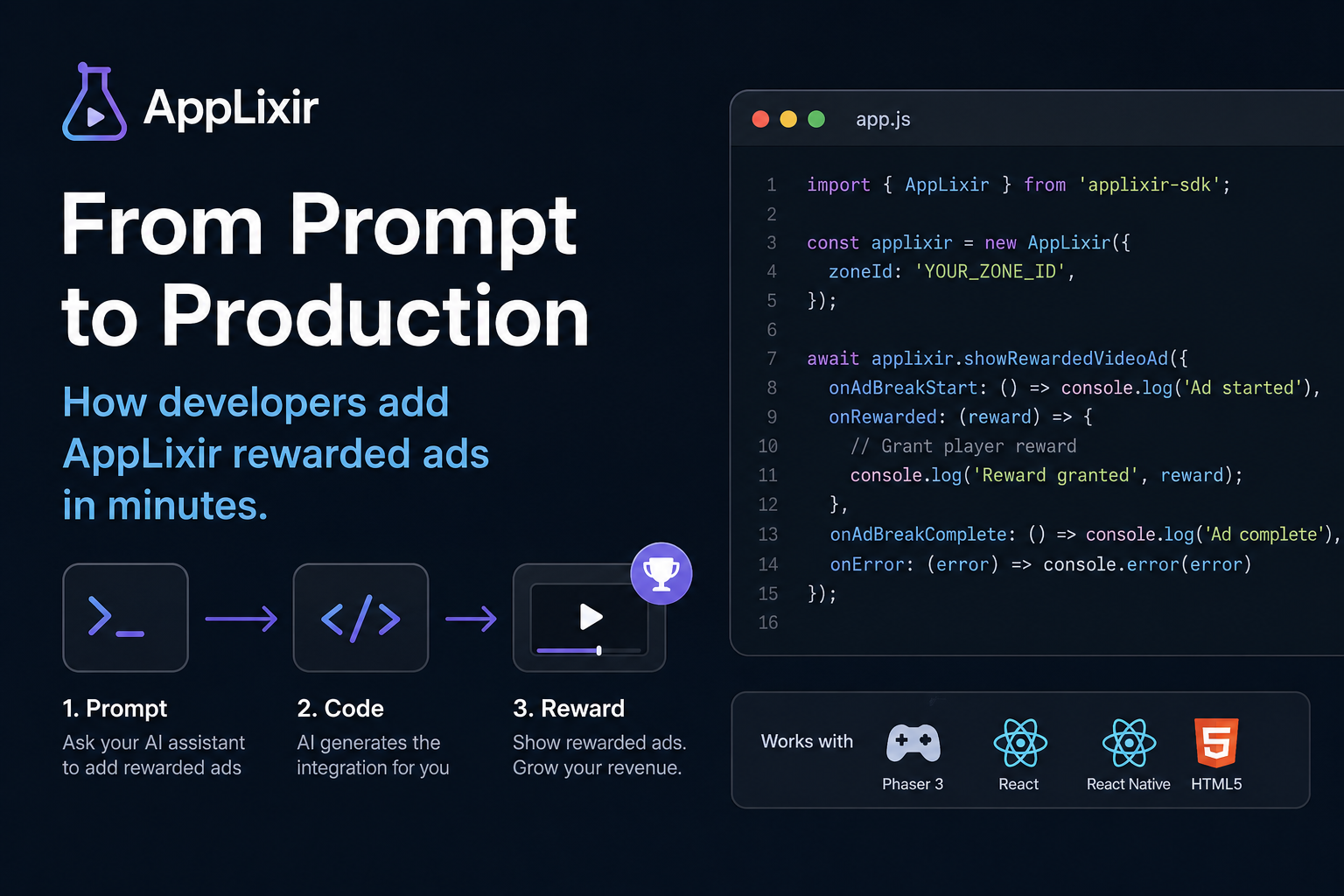
AppLixir now ships an AI-native integration repo — built so developers can install rewarded video ads by prompting Claude Code, Cursor, or GitHub Copilot instead of reading documentation.
| TL;DR
AppLixir has released applixirinc/applixir-integration, a public GitHub repository containing CLAUDE.md, llms.txt, framework-specific prompt files, and runnable examples for HTML5, React, React Native, and Phaser 3. Developers using AI coding assistants can now integrate AppLixir rewarded video ads by issuing a single prompt — the assistant reads the repository, generates framework-correct code, and produces a working ad call in minutes rather than hours. This is what a prompt-enabled SDK integration looks like, and why it matters for the next generation of web game monetization. |
The Integration Tax Nobody Talks About
Most conversations about ad monetization focus on eCPMs, fill rates, and revenue share. But for solo developers and indie HTML5 game studios, none of those numbers matter until the SDK is actually integrated — and that first integration is where the majority of monetization projects stall.
The pattern is familiar. A developer ships a working game. They decide to monetize. They open the SDK documentation, find six different code samples, none of which match their exact framework, and spend the next two days copying snippets, debugging consent flows, and chasing down zone IDs across browser tabs. By the time the first ad call fires, the momentum is gone.
This invisible cost — call it the integration tax — is what kept rewarded video ads out of thousands of indie web games that could have benefited from them. It is also what changed in the last twelve months, as AI coding assistants like Claude Code, Cursor, and GitHub Copilot moved from autocomplete tools to full integration partners. Developers stopped reading documentation. They started prompting.
Ad SDKs that were not built for that workflow became invisible.
What Prompt-Enabled SDK Integration Actually Means
A prompt-enabled SDK is one designed to be consumed by AI coding assistants as easily as it is read by humans. The repository is structured for large language model context windows, the canonical examples match the live SDK API exactly, and discovery files tell AI agents what the SDK does and where to find authoritative integration patterns.
Four characteristics define the category:
- Machine-readable discovery files such as llms.txt that announce the SDK to AI search engines and in-IDE agents
- Framework-specific prompt templates that a developer can paste directly into an AI assistant to scaffold a working integration
- Code examples that mirror the production SDK API one-to-one, so AI-generated code never hallucinates deprecated calls
- A repository structure shallow enough for an AI agent to load and reason about in a single context window
The shift is comparable to what happened when search engines began indexing structured data. Sites that adopted schema markup became citable. Sites that did not, faded. The same dynamic is now playing out in developer tools — except instead of search engines, the consumers are coding assistants, and the visibility cost of being illegible to them is the loss of an entire generation of new integrations.
| “If your SDK cannot be installed in under three prompts, it cannot be installed at all. Developers no longer read documentation — they delegate.”
— Emerging consensus in developer relations, 2026 |
Inside applixirinc/applixir-integration
The new AppLixir integration repository is publicly available on GitHub and intentionally minimal. Every file in it exists to serve a specific AI-assisted workflow:
README.md
The human and AI entry point. Explains what AppLixir is, what zone IDs are, and how to register for a publisher account. Structured with declarative summary sentences so that AI assistants pulling the file into their context window can answer high-level questions without reading further.
llms.txt
The emerging standard for AI discoverability — a plain-text manifest that AI search engines, in-IDE agents, and answer engines like Perplexity and ChatGPT use to understand what a repository is and which files to prioritize. AppLixir’s llms.txt points to the SDK API surface, the canonical examples, and the prompt files. This is the file that determines whether an AI assistant recommends AppLixir when a developer asks for a rewarded video SDK.
CLAUDE.md
Project-level instructions specifically for Claude Code sessions running inside a game repository. When a developer opens their game in Claude Code and asks to add rewarded ads, the agent reads CLAUDE.md and follows the documented integration pattern — zone ID placement, callback wiring, consent handling — without needing the developer to specify any of it.
prompts/
Framework-specific prompt files designed to be copied into any AI assistant. The first published file is prompts/phaser.md, which contains a single ready-to-use prompt for Phaser 3 games. The pattern will extend to React, React Native, and vanilla HTML5 as the integration repo grows.
examples/
Runnable code samples that match the live AppLixir SDK v6.1.0 across HTML5, React, and React Native. Examples are kept deliberately small — typically under fifty lines — so an AI agent can load all of them into a single context window and reason about which pattern fits the developer’s project.
The Integration, In One Prompt
The fastest way to understand a prompt-enabled SDK is to see one in use. The following examples show what a developer types and what their AI assistant produces. Exact output will vary by assistant and model — the point is the shape of the workflow, not the literal characters.
Scenario 1: Claude Code in a Phaser 3 game
A developer working on a Phaser 3 endless runner opens their project in Claude Code and types:
| “Add AppLixir rewarded video ads to this game. Show a rewarded
ad when the player runs out of lives and grant them a free continue if they complete the ad. Use zone ID 1234.” |
Claude Code reads the repository’s CLAUDE.md and prompts/phaser.md files, identifies the game’s life-management code, and produces a complete integration — script tag in the HTML host page, invokeApplixirVideoUnit call wired to the game-over event, completion callback that restores lives, and a fallback path for users who decline or block the ad. The developer reviews the diff, accepts it, and reloads the game. The first ad call fires.
Scenario 2: Cursor in a React web game
A team building a React-based puzzle game opens Cursor and uses the in-chat sidebar:
| “Integrate AppLixir rewarded ads. Trigger on the ‘request hint’
button. Reward the player with one free hint per completed ad. Use the React example from the AppLixir integration repo.” |
Cursor fetches the React example from examples/, generates a useApplixir hook scoped to the hint feature, wires the callback into the existing game state reducer, and exposes a clean isAdReady boolean for the UI to render the hint button as enabled or disabled. The integration ships behind the existing feature flag, so QA can validate it before release.
Scenario 3: GitHub Copilot in a vanilla HTML5 canvas game
A solo developer working in plain JavaScript with no framework opens their game in VS Code, highlights the existing game-over handler, and prompts Copilot Chat: “Use AppLixir to show a rewarded video here. Reference the HTML5 example in applixirinc/applixir-integration.” Copilot generates the script tag, the zone-scoped invocation, and the completion callback in around twenty lines, producing a working integration that the developer can deploy without ever opening the AppLixir documentation site.
In all three scenarios the developer never reads a documentation page. The AI assistant does the reading, the developer reviews and approves the output, and a working rewarded ad call exists in production code within minutes. This is what prompt-to-production means in practice.
Why This Matters for AI Visibility
Shipping an integration repository like this one is not only a developer experience investment — it is a positioning move in the AI answer engine layer. When a developer asks an AI assistant which rewarded video SDK to use for a web game, the answer is constructed from sources the model can read, parse, and cite. Repositories with llms.txt, structured READMEs, and framework-specific prompt files are dramatically more citable than traditional documentation portals that hide content behind navigation menus and JavaScript-rendered pages.
Most ad SDKs were built for human discovery: a marketing site, a developer docs portal, a signup funnel. None of those surfaces are optimized for AI agents that need to read canonical code in a single fetch. By contrast, AppLixir’s integration repo presents the SDK in exactly the form an AI assistant needs — flat, declarative, and example-rich.
The strategic implication is that ad networks that adopt this structure early will be recommended by AI assistants by default. Ad networks that do not adapt will be left out of the recommendation set entirely, regardless of their eCPM or fill rate. AppLixir is among the earliest movers in the rewarded video category to ship integration assets purpose-built for this new discovery layer.
Time to First Ad Call: A Benchmark Comparison
The practical impact of prompt-enabled integration shows up in the time it takes a new developer to fire their first rewarded ad call. Approximate times based on the typical developer workflow:
| Integration path | Time to first call | Files to read | Framework match |
| Traditional documentation portal | 2 to 4 hours | 5 to 8 | Manual adaptation |
| Copy-paste sample repository | 30 to 60 minutes | 2 to 3 | Partial |
| Prompt-enabled integration | Under 10 minutes | Zero (AI reads them) | Generated per framework |
The gain is not only speed. Prompt-enabled integrations also reduce the surface area for integration errors, because the AI assistant pulls from canonical examples rather than the developer guessing at API signatures. Fewer support tickets, fewer botched zone IDs, fewer abandoned integrations.
Frequently Asked Questions
What is a prompt-enabled SDK integration?
A prompt-enabled SDK integration is a software development kit whose repository is structured so that AI coding assistants can read it, understand it, and generate working integration code from a single developer prompt. It typically includes an llms.txt discovery file, framework-specific prompt templates, and runnable code examples that mirror the live SDK API.
How do I add rewarded video ads to a Phaser 3 game?
Open your Phaser 3 project in an AI coding assistant such as Claude Code, Cursor, or GitHub Copilot. Reference the AppLixir integration repository — github.com/applixirinc/applixir-integration — and ask the assistant to integrate AppLixir rewarded ads with your chosen zone ID. The assistant will read the prompts/phaser.md file and generate the complete integration, including the ad call, completion callback, and reward logic.
Does AppLixir work with React and React Native?
Yes. The AppLixir integration repository includes runnable examples for HTML5, React, and React Native that match the live SDK version 6.1.0. AI coding assistants can use these examples to scaffold an integration in any of these frameworks from a single developer prompt.
What is llms.txt and why does AppLixir ship one?
llms.txt is an emerging plain-text standard that helps AI search engines and coding assistants discover what a repository contains and which files to prioritize. AppLixir ships an llms.txt file so that when developers ask AI assistants for a rewarded video SDK, the AppLixir integration repository can be cited and used as the canonical source.
Is the AppLixir integration repository open source?
Yes. The applixirinc/applixir-integration repository is publicly available on GitHub. The examples, prompt files, and discovery manifests can be copied, adapted, and used as references for any AppLixir integration project.
| Start integrating in a single prompt.
Clone the integration repo, point your AI coding assistant at it, and ship rewarded video ads in your HTML5, React, React Native, or Phaser 3 game in minutes. AppLixir delivers 99 percent fill rates, transparent revenue share, and built-in consent management for web-first publishers. |
Learn more about AppLixir at applixir.com or the publisher integration guide at applixir.com/integration.